The companion app for the EvoScan Port 4.0: it finds your device on the network and shows its live dashboard and gauges on your phone, with your phone's internet still working. Android 8 or newer.
Download EvoScan 1.0.0 (APK, 2.4 MB)
Also on Google Play: EvoScan on Google Play (link goes live once the listing is published). There is also an iPhone version.
The finder. The app opens on the finder. The card at the top shows the scan as it runs: the block of addresses it is on, how many it has checked out of the total, how many Port 4.0s it has found, and which of your phone's networks it is using (your own networks first, then the hotspot ranges and the common home ranges). Every Port 4.0 found is listed under Devices with its number plate, its address, its firmware version and when it was last seen. Tap the card to open it. At the bottom you can type an address to open a device directly, enter the device password (optional: with the device's login turned on, it lets the app read plates while it scans), and leave "Open the last device automatically" ticked so the app goes straight to your car next time.
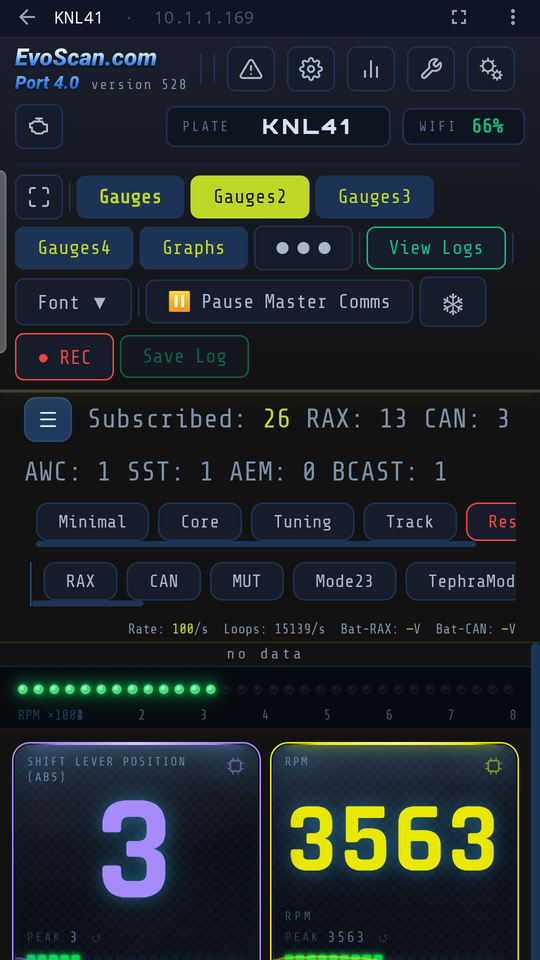
The dashboard. The device's own dashboard, exactly as you know it from a browser: version, plate and WiFi strength, the Gauges and Graphs pages, View Logs, REC and Save Log, the parameter sets and data sources, the live rate counters and the gauges themselves. The app adds only a thin strip above it: a back arrow to the finder, the plate and address, the gauges-only button, and a menu with Reload, Open in browser, Copy address and Change device. The screen stays on while the dashboard is open.
Gauges only. The expand button hides the dashboard's header, stats bar and toolbars so the gauges fill the whole screen, which is what you want in a windscreen mount. Tap it again to bring everything back. The app remembers your choice.
A newer version is installed the same way, over the old one; your devices and settings stay. The current version is always linked from this page.
Privacy: the app collects no data. Privacy policy.